
Above the Fold: What Actually Belongs There (with Examples)
Most landing pages waste their above-fold space on hero images and taglines. Here's exactly what belongs in those first few seconds - and what doesn't.
Introduction
You have about three seconds.
That's how long a visitor spends deciding whether to stay on your landing page or leave. Everything that happens in those three seconds happens above the fold - the portion of the page visible without scrolling.
Most pages waste this space.
They fill it with a full-screen hero image, a vague tagline, and a navigation bar with six options. The visitor sees something visually impressive, understands nothing specific about the offer, and moves on.
This guide covers exactly what belongs above the fold, what doesn't, and how to check whether your current layout is working before you run a single test.
What "Above the Fold" Actually Means Today
The term comes from newspapers - the top half of a folded paper, visible on the stand before you pick it up.
On the web, "above the fold" means everything visible in the browser window on initial load, before scrolling.
The complication: there's no single fold anymore.
A 27-inch desktop monitor shows far more content than a mobile phone in portrait mode. A laptop in a browser with a bookmarks bar shows less than one without. "Above the fold" is a range, not a fixed line.
The practical implication: design your above-fold section for the smallest common viewport your traffic uses. For most landing pages getting paid traffic, that's a mobile phone screen - roughly 390px wide and 844px tall, minus browser chrome.
If your CTA is visible on desktop but falls below the fold on mobile, it's effectively below the fold for the majority of your visitors.
The 5 Elements That Belong Above the Fold
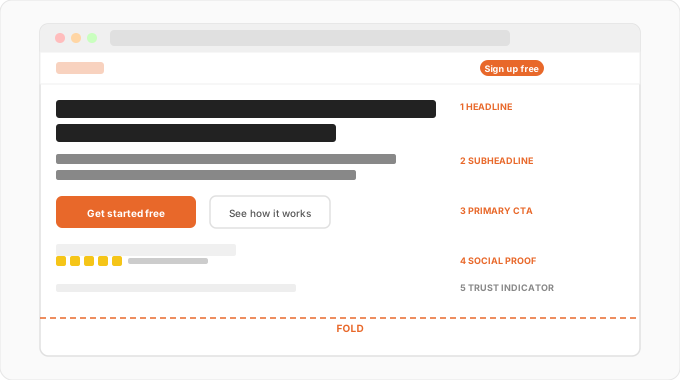
1. A Clear, Specific Headline
Your headline does one job: make the visitor feel like they're in the right place.
It should answer three questions without the visitor having to think: what is this, who is it for, and what's the outcome?
"Project management software" answers none of them.
"The project tool freelancers use to stop chasing clients for feedback" answers all three.
Specificity beats cleverness every time above the fold. If a visitor has to think about what your headline means, you've already lost them.
2. A Subheadline That Adds One Layer of Detail
The subheadline isn't a second headline. It's the one thing that builds on the headline - usually by addressing the "how" or adding proof to the "what."
Headline: "Stop losing deals to slow follow-up"
Subheadline: "Automate your outreach so prospects hear from you within minutes, not days."
Keep it to one or two sentences. If you find yourself writing a paragraph, you're writing body copy, not a subheadline.
3. A Primary CTA - Visible Without Scrolling
Your CTA needs to be above the fold. This sounds obvious. It's violated constantly.
Three things matter here:
Placement: The button should sit naturally after the headline and subheadline. Visitors read top to bottom. The CTA should be where the eye arrives after reading the opening.
Contrast: The button must stand out visually from the background. If your page uses a white or light background, a grey button is invisible. If your hero section has a busy background image, a white button disappears.
Text: "Get Started" is weak. "Start your free trial," "See how it works," "Get your free audit" - these tell the visitor exactly what happens when they click, which reduces hesitation.
One test: blur your page and see if the CTA button is still identifiable as the thing to click. If it disappears into the background at blur, it won't register in the peripheral vision of a real visitor either. Run a free squint test on BlurTest to check this before you touch the copy.
4. A Single Trust Signal Near the CTA
Visitors hesitate at the point of action. A small trust signal near the CTA - not buried at the bottom of the page - can significantly reduce that hesitation.
This doesn't need to be a full testimonials section. It can be:
- Star rating with review count ("4.8 stars, 2,300+ reviews")
- A recognizable logo bar ("Used by teams at [Company A], [Company B]")
- A one-line result stat ("Customers reduce churn by 34% in the first 90 days")
- A risk reducer ("Free 14-day trial, no credit card required")
Keep it tight. One signal, well-placed, beats five signals competing for attention.
5. A Visual That Supports the Offer (Not Just Fills Space)
Many landing pages include a hero image or product screenshot above the fold. This is fine - if it does a job.
A product screenshot showing the exact feature you're talking about in the headline: useful. It makes the offer tangible.
A generic stock photo of people in a meeting, or an abstract gradient background with no relation to the product: decoration. It takes up above-fold space without earning it.
The visual should reinforce the headline, not compete with it. If the image gets more visual weight than the headline, you have a hierarchy problem.
What Doesn't Belong Above the Fold
Full-screen hero images with no text
They look impressive in design portfolios. They perform poorly on landing pages. Visitors come with a question - "is this right for me?" A full-screen image answers nothing.
Navigation with too many options
A navigation bar with 6-8 links gives visitors 6-8 reasons to leave the page. Landing pages should have minimal navigation - ideally none, or just a logo and a CTA button.
Long introductory paragraphs
Visitors don't read above the fold. They scan for signals. A three-paragraph introduction before any CTA loses most visitors before they understand the offer.
Multiple competing CTAs
"Get started" + "Watch demo" + "Learn more" + "Contact us" - each additional CTA reduces the chance any of them get clicked. One primary CTA above the fold. One secondary if needed. Nothing else.
Autoplay video without a clear CTA nearby
Video can work above the fold as supporting content. But it should never be the only thing there, and the CTA shouldn't depend on the visitor watching it first.
The Most Common Above-Fold Mistake
The single pattern that kills above-fold conversion more than anything else:
The headline and the visual are competing for the same attention.
It looks like this: large, full-width hero image (often with text overlay), and a headline somewhere in or below it fighting to be read.
The visitor's eye doesn't know where to go. The hero image wins because it's bigger and more visually dominant. The headline - your actual message - gets ignored.
The fix is usually simple: reduce the visual weight of the image, increase the visual weight of the headline, and give the CTA clear contrast against both.
You don't need to remove the hero image. You need to make sure the hierarchy is: headline first, CTA second, visual third.
To check this on your own page: blur it and see what catches your eye in the first three seconds. If the image dominates and the headline fades, that's your problem. See how visual hierarchy analysis works for a faster way to spot this than waiting for heatmap data.
How to Audit Your Above-Fold Section Right Now
Run through this before your next design change or A/B test:
Step 1: Check on mobile
Open your landing page on a real phone. What's visible before you scroll? Is the headline readable? Is the CTA tappable without zooming? Does the layout hold?
Step 2: The three-second test
Look at your above-fold section for three seconds, then look away. What do you remember? If it's the image rather than the headline and offer, you have a hierarchy problem.
Step 3: The blur test
Blur your page. Can you still see the CTA button? Does the headline block have more visual weight than the hero image? Run a free squint test if you want a systematic version of this.
Step 4: Read the headline out loud
Does it clearly say what the product does, who it's for, and why they should care? If you have to explain it, rewrite it.
Step 5: Count your CTAs
How many action options are visible above the fold? If it's more than two, cut until you have one primary and at most one secondary.
Above-Fold Checklist
- Does the headline answer: what is this, who is it for, what's the outcome?
- Is the subheadline one or two sentences that add one specific detail?
- Is the primary CTA visible without scrolling on a mobile screen?
- Does the CTA button stand out visually from the background?
- Is there one trust signal near the CTA?
- Does any hero image support the offer rather than just fill space?
- Is there minimal navigation (no more than logo + one CTA)?
- Does the headline have more visual weight than the hero image?
Summary
Above-the-fold space is the most valuable real estate on your landing page. Most of it gets wasted on decoration.
The five elements that belong there are: a specific headline, a focused subheadline, a visible primary CTA, a single trust signal, and a supporting visual. Everything else is a distraction that costs you conversions.
Before you run any test on your above-fold section, check the hierarchy first. Make sure the headline dominates, the CTA is visible, and the visual supports rather than competes. Those structural fixes almost always move the needle more than copy variations.
Want to see what your above-fold section looks like to a first-time visitor? Run a free squint test on BlurTest - find out what stands out, what gets ignored, and where your CTA actually registers.