
How to Do a Blur Test: Step-by-Step Guide for Designers
Blur your design until the text is unreadable — whatever still stands out is what visitors see first. The complete guide: why it works, three ways to run it, and what to look for on websites, ads, emails, app screens and thumbnails.
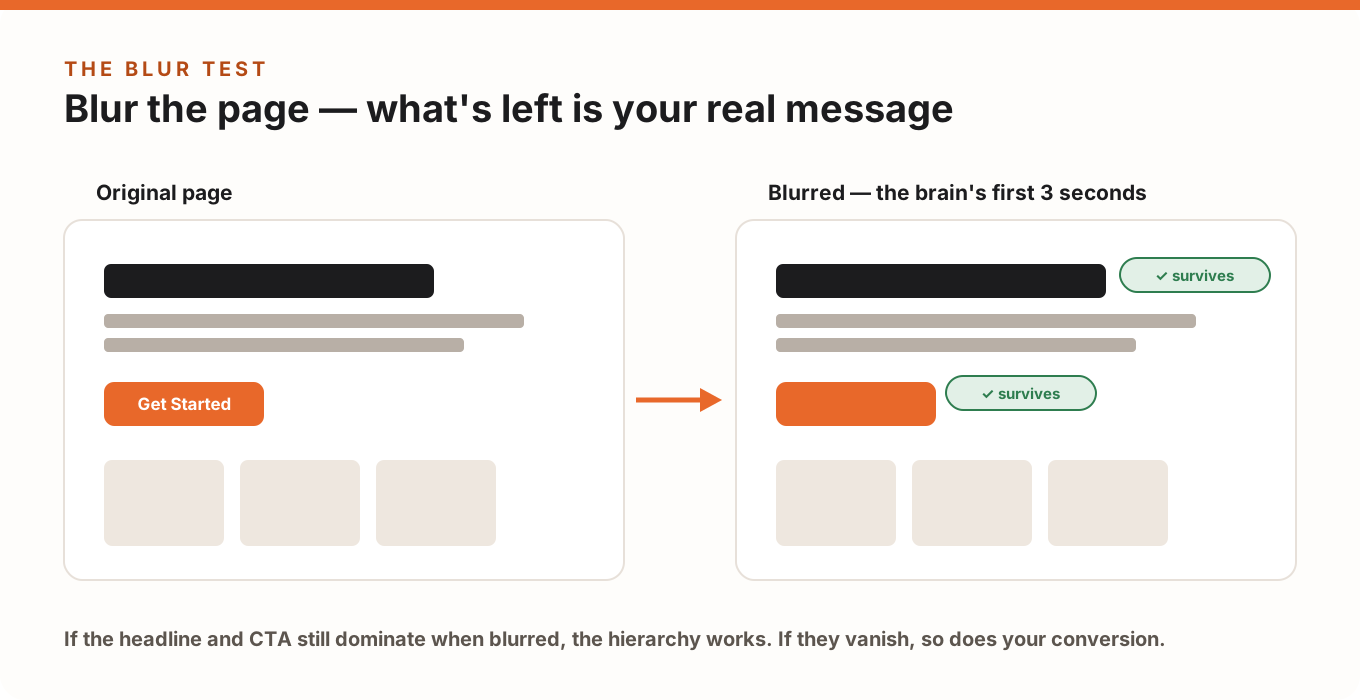
The blur test is the fastest way to find out whether your design actually communicates. Blur the page until the text is unreadable — whatever still stands out is what visitors see first. If your headline and call-to-action survive the blur, your visual hierarchy works. If they vanish into gray mush, so does your conversion rate.
Designers have used this trick (and its low-tech cousin, the squint test) for decades. This guide covers why it works neurologically, three ways to run it — from squinting to full automation — and exactly what to look for on websites, ads, emails, app screens and thumbnails.
Why the Blur Test Works: Your Brain Sees Shapes Before Words
In the first moments on any page, the brain doesn't read — it runs pre-attentive processing: an automatic scan of size, color, contrast and position that happens in under half a second, before conscious attention kicks in. Whatever wins that scan gets looked at first; everything else waits its turn or never gets seen.
Blurring a design strips away the details (words, textures, faces) and leaves exactly the signals pre-attentive processing uses. That's why the blurred version of your page is an honest preview of a stranger's first glance — and why the test catches problems that staring at the sharp version never will. You built the page; you can't un-know where the button is. The blur can.
Blur Test vs Squint Test: Same Idea, Different Rigor
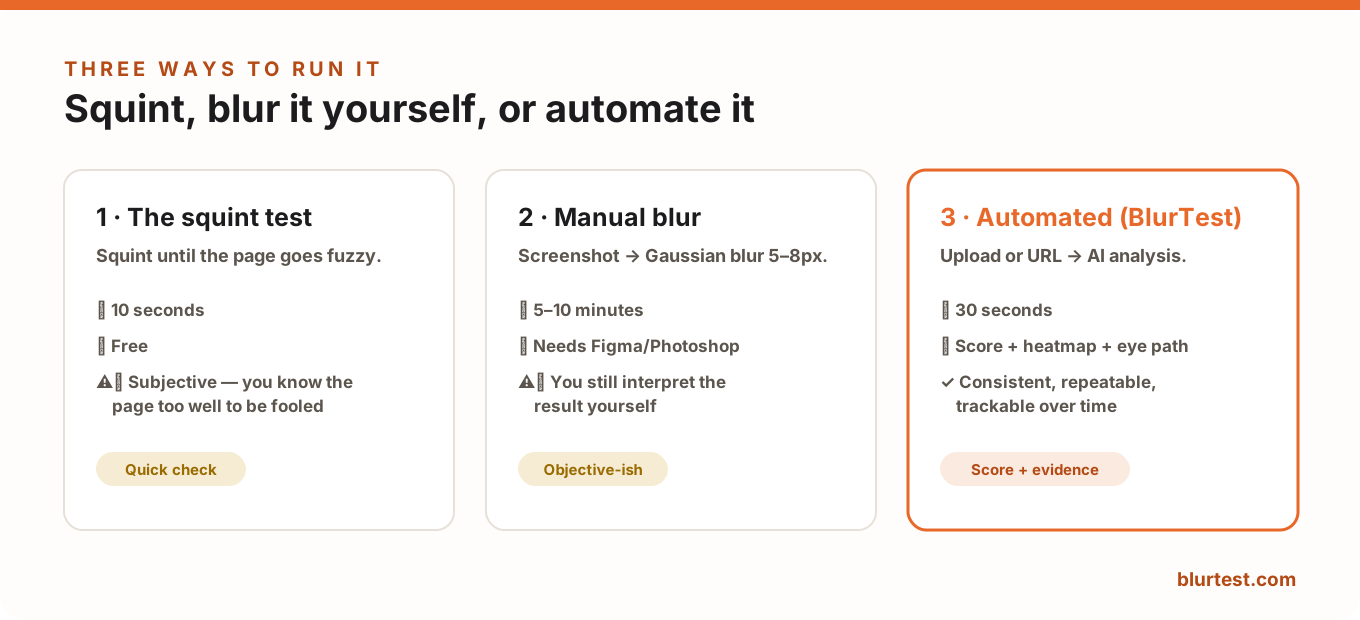
The squint test is the informal version: squint at your screen until things go fuzzy and notice what still reads. It costs nothing and takes ten seconds — but it's subjective. Your squint isn't reproducible, and you're a biased observer of your own work.
The blur test applies a real Gaussian blur to a screenshot, so everyone evaluates the same image. Same principle, more rigor — and it can be automated.
Method 1 — The Squint Test (10 seconds)
- Open the page at normal size, lean back to arm's length.
- Squint until text becomes unreadable and shapes go soft.
- Ask: what do I notice first? Can I still find the action button?
Use it as a habit while designing — a quick sanity check after every significant change. Just don't treat it as evidence: you know the page too well to be fooled by your own squint.
Method 2 — Manual Blur in Figma or Photoshop (5–10 minutes)
- Screenshot the area you're testing — usually the above-the-fold section at real viewport size (1440px desktop, 390px mobile).
- Apply Gaussian blur. Figma: select the image → Effects → Layer blur, 5–8px. Photoshop: Filter → Blur → Gaussian Blur, radius 5–8px. The text should be illegible but shapes clearly visible.
- Evaluate at a glance — first instinct, not a study: What dominates? Is the CTA findable in under a second? How many elements compete?
- Repeat on mobile. Hierarchy that works on a wide screen often collapses in a single narrow column.
Pro tip: do the evaluation with someone who hasn't seen the page. You provide the blur; they provide the honest eyes.
Method 3 — Automated Blur Test (30 seconds)
Manual testing has two limits: it takes time, and the interpretation is still yours. BlurTest automates the whole loop — upload a screenshot or enter a URL, and the AI applies the blur, simulates first-glance attention, and returns a clarity score, an attention heatmap and a predicted eye path, plus specific fixes. Because the process is identical every run, you can test variants fairly and track whether a redesign actually improved the score. No account needed to try it — the free design roast runs the same engine with a sense of humor.
What to Look For, by Content Type
- Websites & landing pages: headline and primary CTA must survive; decorative hero images shouldn't win. One dominant element per screen.
- Banners & display ads: at banner sizes the blur is brutal — your offer and brand must both read as shapes. If the logo disappears, the impression is wasted.
- Emails: blurred, a good email shows one headline block and one button. Three products and three buttons blur into uniform gray — and get deleted.
- App screens: the primary action of the screen should be the obvious survivor; if navigation chrome dominates, the screen's job is unclear.
- Social posts: feeds scroll at blur speed already. If the post doesn't communicate blurred, it won't stop a thumb.
- YouTube thumbnails: thumbnails are viewed tiny — effectively pre-blurred. Faces, one bold subject and 3-4 words max survive; detailed scenes don't.
The 4 Most Common Blur Test Findings (and Fixes)
- The CTA disappears. Low contrast, small size, or crowded placement. Fix: raise the button's contrast against its actual background and give it whitespace.
- A decorative image dominates. The photo is your loudest element but carries no message. Fix: shrink it, mute it, or make it point at the headline/CTA.
- Everything shouts equally. Uniform blocks of same-size, same-weight content. Fix: pick one winner per screen and demote the rest — see what should dominate.
- The headline loses to a badge or logo. Brand elements outweigh the value proposition. Fix: your offer, not your logo, should be the largest text on the page.
What the Blur Test Can't Tell You
The blur test evaluates the first glance — hierarchy, not content. It can't judge whether your headline is persuasive, your offer competitive, or your page trustworthy. Treat it as step one: fix the hierarchy first so people see your message, then improve the message itself with a full 10-minute audit and real A/B tests.
Blur Test FAQ
How much blur should I apply?
Enough that text is unreadable but shapes are clear — usually 5–8px Gaussian blur on a normal-resolution screenshot. If you can still read the headline, add more; if you can't tell a button from a paragraph, use less.
Is the blur test scientific?
It's a practical proxy for well-documented perception research (pre-attentive processing, peripheral vision), not a lab study. It reliably reveals what dominates a design; pair it with analytics and testing for the full picture.
How often should I run it?
Every time a page or creative changes meaningfully, and before you spend money driving traffic to it. It's 30 seconds that regularly saves a failed campaign.
Ready to see your own page the way strangers do? Run a free blur test with BlurTest — upload or paste a URL, get your score in 30 seconds.
Put your landing page through the blur test
Upload a screenshot or enter your URL — see in 30 seconds what visitors actually notice, what disappears, and exactly what to fix.
Analyze My WebsiteOr start with a free design roast — no signup needed.