
Why Your Landing Page Has a High Bounce Rate (And How to Fix It)
A high bounce rate on a landing page usually has one of five causes. Here's how to diagnose which one is hurting you - and what to fix first.
Introduction
A high bounce rate feels like a dead end.
Visitors land on your page, leave without clicking anything, and you're left wondering what went wrong.
The frustrating part is that "high bounce rate" tells you something is broken - but not what. You could spend weeks testing button colors and font sizes while the actual problem sits untouched.
This guide walks through the five most common causes of a high landing page bounce rate, how to figure out which one is yours, and what to fix first.
First: What Does Bounce Rate Actually Tell You?
A bounce happens when someone visits your page and leaves without taking any action - no click, no scroll to another page, no form submission.
High bounce rate means visitors aren't engaging. But it doesn't tell you why.
Two pages can both have a 75% bounce rate for completely different reasons:
- Page A: Great traffic, confusing headline. Visitors don't understand what the product does.
- Page B: Excellent clarity, wrong audience. People understand the offer perfectly - it's just not for them.
The fix for Page A is rewriting the headline. The fix for Page B is fixing the traffic source.
This is why diagnosing the cause matters before you change anything.
The 5 Most Common Causes
1. Headline-Traffic Mismatch
This is the most common cause - and the most overlooked.
Your ad or search result created an expectation. The landing page didn't deliver on it.
Someone clicks a Google ad for "affordable project management for freelancers." They land on a generic homepage for enterprise software. The headline reads "Streamline Your Team's Workflow." They leave in two seconds.
Message match between your traffic source and your landing page is the single biggest lever for reducing bounce rate. The visitor should feel like the page was written specifically for them, based on what they just clicked.
Check this first: what does your ad, email, or organic listing say - and does your headline echo it back?
2. Visual Hierarchy Failure
Visitors don't read landing pages. They scan.
Within three seconds, they're making a subconscious decision: does this look like something worth my attention?
If your CTA is buried below the fold, your headline competes visually with a large hero image, or the page has no clear focal point - visitors won't know where to look. So they don't stay.
A useful way to test this: blur your page and look at it for three seconds. What stands out? If the answer is a decorative background image instead of your headline and CTA, you have a visual hierarchy problem. Run a free squint test on BlurTest to see exactly where attention goes on your page before visitors even start reading.
3. Slow Page Load
Every second of load time costs you visitors.
Google's research shows 53% of mobile users abandon a page that takes more than three seconds to load. For landing pages driving paid traffic, that means you're paying for clicks that never see your content.
Common causes: unoptimized images, too many third-party scripts, no CDN, server response time issues.
Check your load time with Google PageSpeed Insights or WebPageTest. If you're above three seconds on mobile, fix this before you touch anything else.
4. No Clear Next Step
Sometimes visitors read your page, understand your offer, and still leave.
Not because they're uninterested - but because nothing told them what to do next.
This happens when:
- The CTA is vague ("Learn More," "Explore," "Discover")
- There's only one CTA at the top and nothing at the bottom for visitors who scrolled
- The CTA text doesn't match the visitor's stage - someone still evaluating doesn't want to "Buy Now"
The fix isn't always a better button. Sometimes it's adding a secondary CTA for visitors who aren't ready to commit, or making the primary CTA more specific ("See how it works" instead of "Get started").
5. Broken Mobile Experience
Most paid traffic lands on mobile. If your page was designed for desktop, you're losing a large portion of your visitors immediately.
Common mobile issues that spike bounce rate:
- CTA is below the fold on a phone screen
- Text is too small to read without zooming
- Images stretch or break the layout
- Tap targets (buttons, links) are too close together
Check your page on a real device, not just a browser resize. The emulator lies.
How to Diagnose Your Cause
You need data before you start changing things. Here's where to look:
Bounce rate by traffic source
If organic traffic bounces at 40% and paid traffic bounces at 80%, the problem is message mismatch between your ads and the page - not the page itself.
Bounce rate by device
If mobile bounces at 85% and desktop at 45%, you have a mobile experience problem. If both are high, the issue is the page content.
Scroll depth
If 70% of visitors don't scroll at all, something in the first screen is failing. That's usually headline clarity or visual hierarchy - go to causes 1 and 2.
If visitors do scroll but still bounce, the problem is deeper in the page - no compelling reason to act, or no clear CTA.
Session recordings
Look for visitors who move the cursor to the CTA and then scroll away. That hesitation usually means a trust issue - they want to click but something is stopping them. Adding social proof near the CTA often fixes this.
Page speed
Check this separately. A high bounce rate from a slow page looks identical to a high bounce rate from bad content in your analytics. PageSpeed Insights will tell you in 30 seconds.
The squint test
Blur your page and see what your eye goes to. If it's not the headline and CTA, your visual hierarchy is working against you. See how visual hierarchy analysis works - this is often faster than waiting for session recording data.
Fix Priority Order
Once you know your cause, fix in this order:
- Load speed - if you're over 3 seconds on mobile, nothing else matters until this is fixed
- Message match - align your headline with your traffic source
- Visual hierarchy - make sure your CTA is visible and your headline dominates the above-fold area
- CTA clarity - make the next step obvious and match it to what the visitor is ready to do
- Mobile layout - test on actual devices, fix what breaks
Don't run A/B tests until you've addressed the obvious structural problems. A well-run test on a page with a three-second load time or a broken mobile layout is wasted traffic.
Quick Diagnostic Checklist
Before making any changes, answer these:
- What's my bounce rate by device? (mobile vs. desktop)
- What's my bounce rate by traffic source?
- What's my page load time on mobile?
- Does my headline match what my ad or listing promised?
- Can I see my CTA clearly when I blur the page?
- Have I tested this on a real phone recently?
- Do I have scroll depth data showing where people stop?
If you answer these seven questions honestly, the cause usually becomes obvious without running a single test.
Summary
A high bounce rate is a symptom, not a diagnosis.
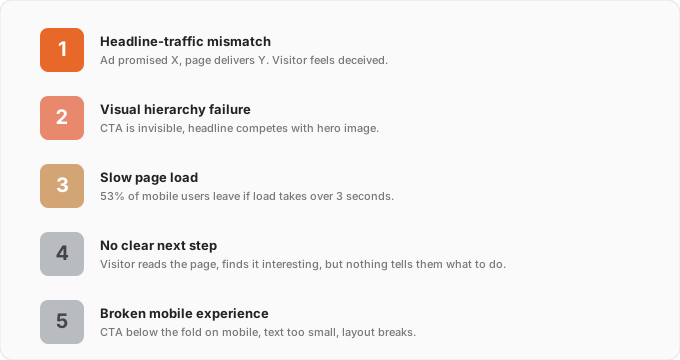
The five causes - headline-traffic mismatch, visual hierarchy failure, slow load, unclear CTA, broken mobile experience - each require a different fix. Treating the wrong one wastes time and traffic.
Start with your data. Segment by device and source. Check load speed. Run a squint test. Then make one targeted change based on what you find.
Most bounce rate problems are fixable without a major redesign. You just need to find the right cause first.
Not sure if your visual hierarchy is contributing to your bounce rate? Run a free squint test on BlurTest - see what your visitors see when they land on your page for the first time.
Put your landing page through the blur test
Upload a screenshot or enter your URL — see in 30 seconds what visitors actually notice, what disappears, and exactly what to fix.
Analyze My WebsiteOr start with a free design roast — no signup needed.