
Standard Banner Ad Sizes: The Complete Guide (with Design Rules per Size)
Five sizes carry most display inventory — and each ratio demands its own composition, not a scaled export. The core five to scale, second-priority sizes, per-ratio design rules and the specs cheat sheet.
Display advertising runs on a handful of standard banner sizes — and two facts about them decide most campaigns. First: five sizes account for the overwhelming majority of inventory, so those five are where design effort belongs. Second: a banner isn't one design scaled five ways — each ratio demands its own composition, because visual hierarchy changes when the canvas does.
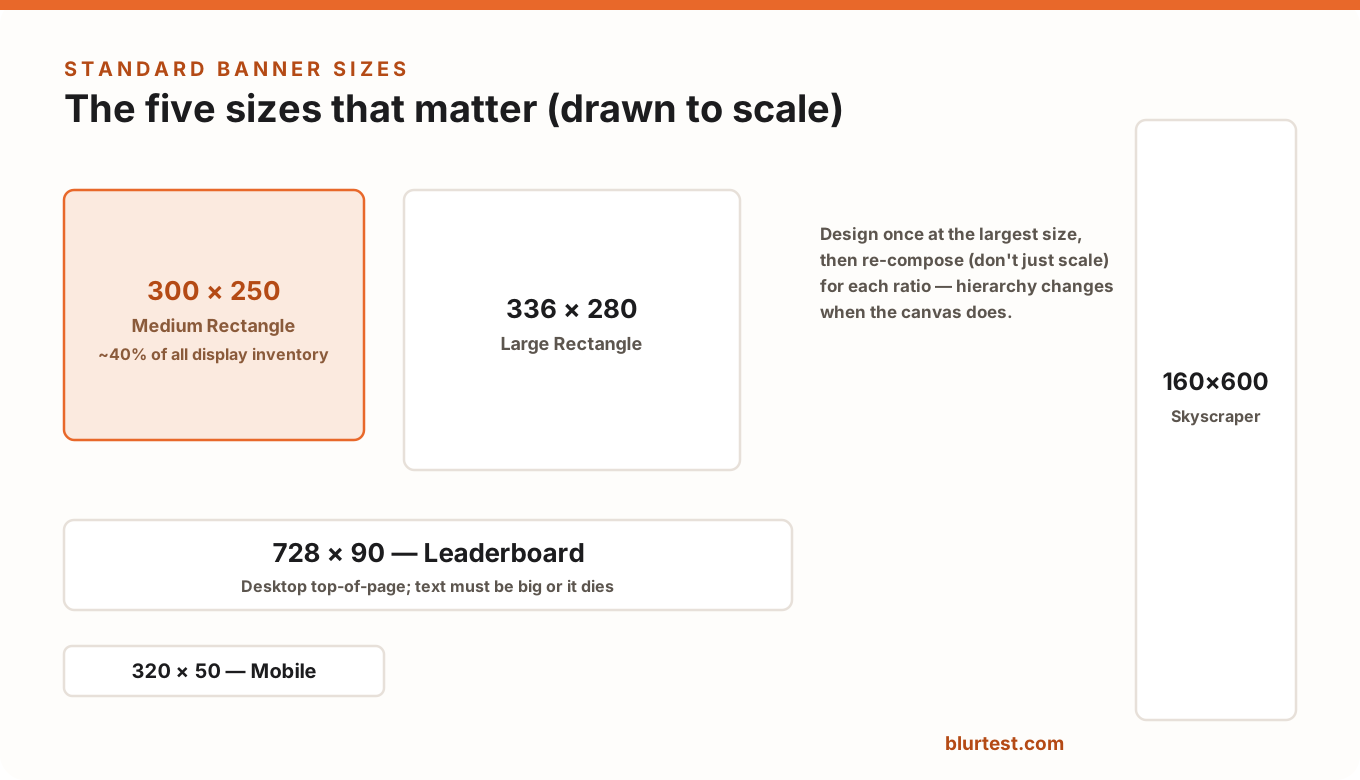
The Core Five (Where the Impressions Are)
- 300 × 250 — Medium Rectangle. The workhorse: roughly 40% of display inventory, works in-content on desktop and mobile alike. If you design one size first, it's this one.
- 336 × 280 — Large Rectangle. The medium rectangle's roomier sibling, strong in-content performer; usually the same composition with more breathing room.
- 728 × 90 — Leaderboard. Desktop top-of-page. Extreme horizontal ratio: brand left, one-line message center, button right. Vertical stacking dies here.
- 320 × 50 — Mobile Banner. Tiny and brutal: brand mark, 3–4 words, arrow. Anything more becomes unreadable. (Its taller cousin 320×100 doubles your chances.)
- 160 × 600 — Wide Skyscraper. Sidebar vertical: stack brand → message → visual → button top-to-bottom, one element per "floor".
Worth Having, Second Priority
- 970 × 250 — Billboard: premium top-of-page canvas; treat it as a mini landing page hero with real whitespace.
- 300 × 600 — Half Page: high-impact sidebar, growing share; enough room for a proper visual plus message.
- 320 × 100 — Large Mobile Banner: where offered, always prefer it over 320×50.
- Responsive display ads: Google assembles these from your assets — which makes asset hierarchy (short headline, one clean image, logo) matter even more, since you don't control final composition.
Design Rules Per Ratio
The reason "export the 300×250 at five sizes" fails: reading order is built from position and proportion, and both change with the frame. Practical guardrails:
- Rectangles (300×250, 336×280): layered layout — message top, visual middle, CTA bottom. Closest to a tiny landing page.
- Horizontals (728×90, 320×50, 970×250): one-line grammar, left-to-right: brand → message → CTA. The eye shouldn't have to move vertically at all.
- Verticals (160×600, 300×600): a stack read top-down; put the message in the top third — sidebar glances start there and rarely finish the column.
- All sizes: minimum ~16px text at final render, button-shaped CTA, file weight under 150 KB for ad-platform limits and load speed.
The composition principles behind these rules — anatomy, contrast, whitespace — are covered in our banner ad design guide.
Technical Specs Cheat Sheet
- File types: JPG/PNG for static, HTML5 for animated (GIF fading out of favor).
- Weight: ≤150 KB is the safe universal ceiling (Google Ads limit).
- Animation: max 30 seconds, no more than ~3 loops; the final frame must carry the full message.
- Borders: light-background banners need a visible border or tinted canvas, or they dissolve into the page.
Check Every Size Before Launch
A five-size campaign is five separate designs pretending to be one — and usually one or two of them quietly fail (ant-sized text on the mobile banner, a lost CTA on the skyscraper). Before launch, run each size through BlurTest's banner analysis: it blurs the creative to glance-speed and scores whether the message, button and brand still register — per size, in 30 seconds each. Fix the weak sizes before they average your campaign down.
Banner Sizes FAQ
What is the most common banner ad size?
The 300×250 medium rectangle — it accounts for the largest share of display inventory by far, works on both desktop and mobile placements, and typically posts the strongest performance. Design it first.
What sizes do I need for a Google Display campaign?
A solid minimum set: 300×250, 336×280, 728×90, 320×50 (or 320×100) and 160×600 — plus responsive display assets so Google can fill everything else. That covers the vast majority of placements.
Should banners be static or animated?
Static banners are cheaper, universally supported, and — when the hierarchy is right — often perform comparably. If you animate, make the resting frame self-sufficient; many viewers and some placements only ever show that frame.
Test your display ads before you spend on impressions
See whether your banner communicates at a glance — saccade paths, brand visibility and CTA impact, analyzed in 30 seconds.
Analyze My BannerOr start with a free design roast — no signup needed.