How to Test Your YouTube Thumbnail Before Publishing (and Lift CTR)
The algorithm judges your video in the first 48 hours — testing your thumbnail after that is autopsy. The 4-step, 2-minute pre-publish test loop: shrink, blur, feed check, score.
By the time YouTube shows you your thumbnail's click-through rate, the most important window is already gone: the algorithm forms its first opinion of a video in the opening 24–48 hours, and your thumbnail is the single biggest lever on how that window goes. Testing after publishing is autopsy; testing before publishing is strategy.
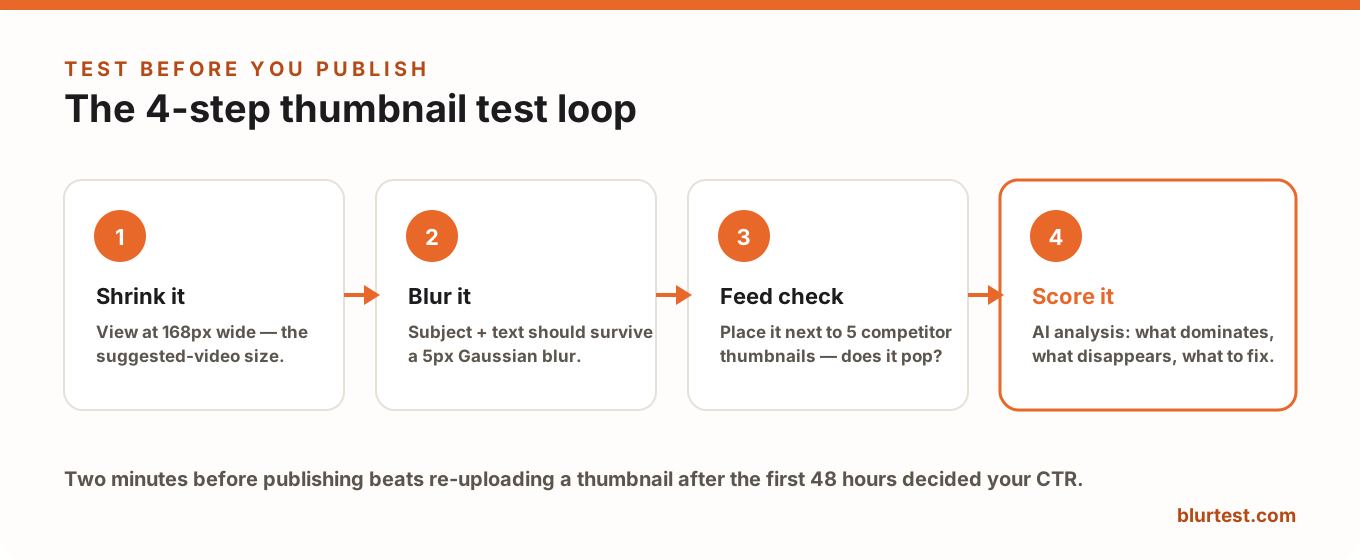
The good news: a meaningful thumbnail test takes about two minutes. Here's the loop.
Step 1 — Shrink It to 168 Pixels
Most impressions happen at the suggested-sidebar and search-result sizes — roughly 168–360px wide, not the 1280px you designed at. Zoom your design out until it's about the width of your thumb and ask three questions:
- Is the subject instantly recognizable?
- Is the text readable without effort?
- Does the emotion still register?
Most thumbnail failures are just this: designs judged at 100% zoom that were never going to be seen at 100% zoom. (Full spec and where each size appears: YouTube thumbnail size guide.)
Step 2 — Blur It
Feed scrolling is fast enough that viewers effectively see thumbnails pre-blurred — shape, color and contrast register before any detail. Apply a 4–6px Gaussian blur (or use the blur test method of your choice) and check what survives: the subject and the text block should still dominate. If the thumbnail collapses into mush, no amount of clever detail will save it, because nobody was going to see the detail anyway.
Step 3 — The Feed Check
Your thumbnail's real competition isn't your other drafts — it's the five videos YouTube will show next to it. Search your target keyword, screenshot the results, and paste your thumbnail into the grid. Two things to check:
- Does it pop or blend? If your niche is all red-and-white screaming faces, the calm dark thumbnail wins attention — and vice versa. Contrast is contextual.
- Does it look like the best video in the row, or the third best? Be honest; the viewer will be.
Step 4 — Score It With an AI Thumbnail Tester
Steps 1–3 have a weakness: you're grading your own homework. An automated thumbnail tester removes the bias. BlurTest's YouTube thumbnail analysis simulates first-glance attention on your image and returns a clarity score, an attention heatmap, and specific findings — what dominates, what disappears at feed size, and what's competing with your subject — in about 30 seconds.
The score matters most comparatively: test your two or three candidate thumbnails and publish the winner, instead of betting the launch window on instinct.
Testing After Publishing: The Swap Strategy
Pre-publish testing picks your best candidate; post-publish data tells you if "best" was good enough. The workflow high-performing channels use:
- Watch CTR against your channel median (Analytics → Reach) for the first few days — not against a global benchmark.
- High retention + low CTR = thumbnail problem. The video delivers; the packaging doesn't. Swap the thumbnail — it's free, keeps all stats, and is the highest-leverage fix on YouTube.
- Change one variable per swap (text, subject, or palette) so you learn something each time. YouTube's built-in "Test & Compare" can rotate up to three thumbnails if you want the platform to pick statistically.
The 2-Minute Pre-Publish Checklist
- Readable and recognizable at 168px?
- Survives a 5px blur — subject and text still dominant?
- Pops against the actual competing thumbnails for your keyword?
- Bottom-right corner free for the timestamp?
- Text adds to the title instead of repeating it?
- Scored — and the best of your candidates, not the only one you made?
FAQ
Is there a free way to test a YouTube thumbnail?
Yes — steps 1–3 (shrink, blur, feed check) cost nothing, and BlurTest's free design roast will give your thumbnail a brutally honest AI critique with no signup. The full thumbnail analysis adds the clarity score and heatmap.
Can I A/B test thumbnails on YouTube directly?
YouTube's "Test & Compare" feature rotates up to three thumbnails and reports a winner based on watch-time share. It's useful but slow (days to weeks) and burns real impressions — which is exactly why pre-filtering your candidates with a 30-second test first makes the live test meaningful.
How much does a thumbnail actually affect views?
Together with the title, it's the deciding factor for whether an impression becomes a view — doubling CTR roughly doubles the traffic from the same impressions. No other post-production change comes close per minute invested.
Test your thumbnail at feed-scroll speed
Thumbnails are judged in milliseconds at tiny sizes. See whether yours survives — and what to fix to lift CTR.
Analyze My ThumbnailOr start with a free design roast — no signup needed.