YouTube Thumbnail Size: Exact Dimensions, Ratio and Safe Zones
1280×720, 16:9, under 2MB — that's the upload spec. But viewers see your thumbnail at 168px in the sidebar. The full spec, the safe zones, and how to design for the size that actually decides your CTR.
The correct YouTube thumbnail size is 1280 × 720 pixels, with a 16:9 aspect ratio, a minimum width of 640 pixels, and a file size under 2 MB in JPG or PNG format. That's the quick answer — but the size that actually decides your click-through rate isn't the one you upload. It's the tiny 168-pixel version most viewers see in the suggested sidebar and search results.
This guide covers the exact specs, the safe zones YouTube's own interface eats into, and how to design a 1280px canvas that still works at phone-feed size.
YouTube Thumbnail Dimensions: The Full Spec
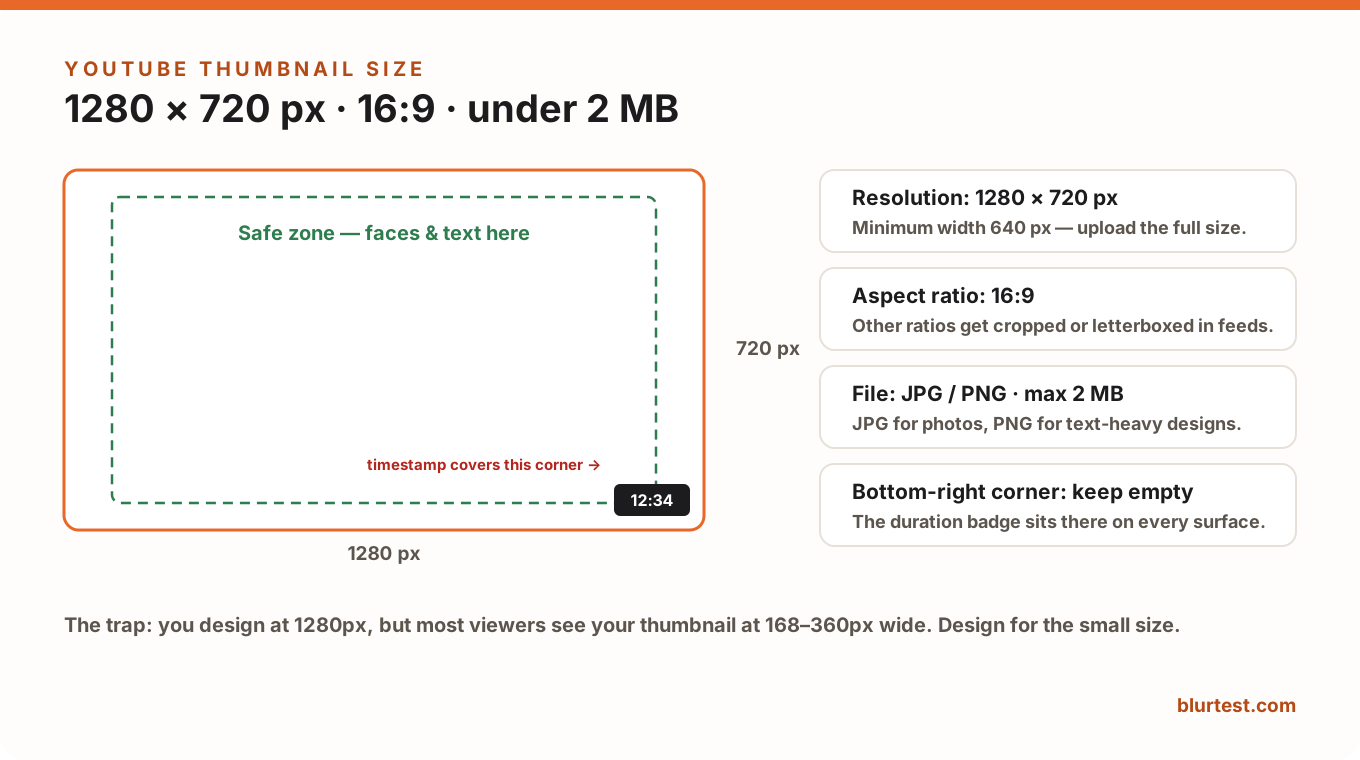
- Resolution: 1280 × 720 px. YouTube accepts anything above 640px wide, but upload the full 1280 — the platform serves higher-DPI versions to retina screens, and upscaled thumbnails look soft.
- Aspect ratio: 16:9. Other ratios get letterboxed or cropped depending on the surface, which usually means your text gets cut.
- File format: JPG, PNG, GIF (static) or WebP. Use JPG for photographic thumbnails, PNG when you have sharp text and flat colors.
- File size: 2 MB maximum. If you're over, export JPG at 80–90% quality — visually identical, half the weight.
- Shorts: vertical 9:16 (1080 × 1920). Shorts thumbnails mostly matter on your channel page, not the Shorts feed itself.
The Safe Zones: What YouTube's UI Covers
Two parts of your canvas don't fully belong to you:
- Bottom-right corner: the duration badge (e.g. "12:34") sits there on every surface. Any text or face in that corner gets covered.
- Outer 5–8%: some surfaces (end screens, certain embeds) crop the edges slightly. Keep faces and text inside a center-weighted safe zone.
The practical rule: put your subject and text inside the middle ~85% of the frame, and treat the bottom-right eighth as occupied.
The Real Question: How Big Is Your Thumbnail Actually Seen?
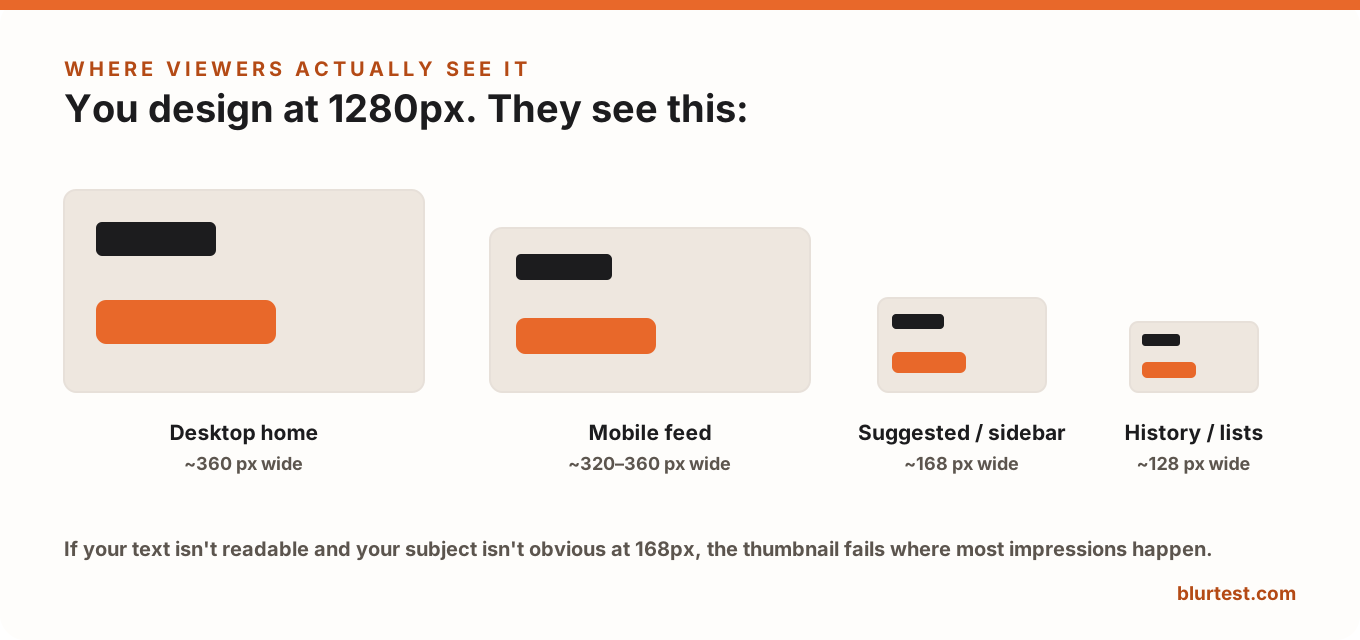
You design at 1280px on a big monitor. Your viewer meets the thumbnail at 168px in the suggested sidebar — where a huge share of impressions happen — or around 320–360px in the mobile feed. At that scale, a thumbnail is effectively pre-blurred: detail disappears, and only strong visual hierarchy survives.
Design rules that follow directly from the small sizes:
- Text: 3–4 words maximum, at a size that fills roughly a quarter of the frame's height. If you zoom your design out to 10% and can't read it, neither can anyone scrolling.
- One subject. A single face or object at 40–60% of the frame beats any composition with three elements.
- Contrast over detail: strong tonal separation between subject and background is what keeps the thumbnail legible when it's the size of a postage stamp.
Common Thumbnail Size Mistakes
- Uploading a 16:9 video frame as-is: stills are usually low-contrast and mid-action; a designed thumbnail nearly always outperforms a frame grab.
- Designing at 100% zoom: everything looks readable on your monitor at 1280px. Judge it at 15% zoom instead.
- Text in the bottom-right: the timestamp eats it.
- Blurry uploads: caused by sub-640px sources or heavy compression — export at full resolution, let YouTube do the downscaling.
Test It at Real Size Before You Publish
The only honest test of a thumbnail is how it behaves small: shrink it to 168px, blur it, and see if the subject and text still communicate. BlurTest's thumbnail analysis automates exactly that — upload your thumbnail and get a clarity score with a heatmap showing what viewers register at feed-scroll speed, before the first 48 hours of CTR data are already spent. Our full guide to testing thumbnails before publishing walks through the complete loop.
YouTube Thumbnail Size FAQ
What size should a YouTube thumbnail be?
1280 × 720 pixels, 16:9 aspect ratio, under 2 MB, in JPG or PNG. The minimum accepted width is 640 pixels, but always upload the full 1280 for sharpness.
Why does my thumbnail look blurry on YouTube?
Usually one of three causes: the source was smaller than 1280px and got upscaled, the export used aggressive compression, or fine details were simply too small to survive downscaling. Re-export at full size and moderate JPG quality.
Can I change a thumbnail after publishing?
Yes, anytime, without affecting the video's stats — swapping a weak thumbnail is one of the highest-leverage fixes for an underperforming video. Test the new one before you swap, though; you only get so many first impressions.
What about YouTube banner and profile sizes?
Channel banner: 2048 × 1152 px (safe area 1235 × 338 centered). Profile photo: 800 × 800 px. Different canvases — same rule: design for the smallest size they'll be seen at.
Test your thumbnail at feed-scroll speed
Thumbnails are judged in milliseconds at tiny sizes. See whether yours survives — and what to fix to lift CTR.
Analyze My ThumbnailOr start with a free design roast — no signup needed.